
Over the past year, I brought Budget Flow to Android using Skip while modernizing its existing UIKit- and Storyboard-based interface with SwiftUI. As a solo developer working on the app alongside my full-time job, I was looking for a modern, shared codebase that would allow me to efficiently develop features and bug fixes without duplicating my efforts. At the same time, Budget Flow had been in users’ hands since 2023, so preserving their data and existing features was essential.
This article covers the choices behind that migration, the persistence and package architecture that made it possible, and practical lessons from getting an established Swift app working on both platforms.
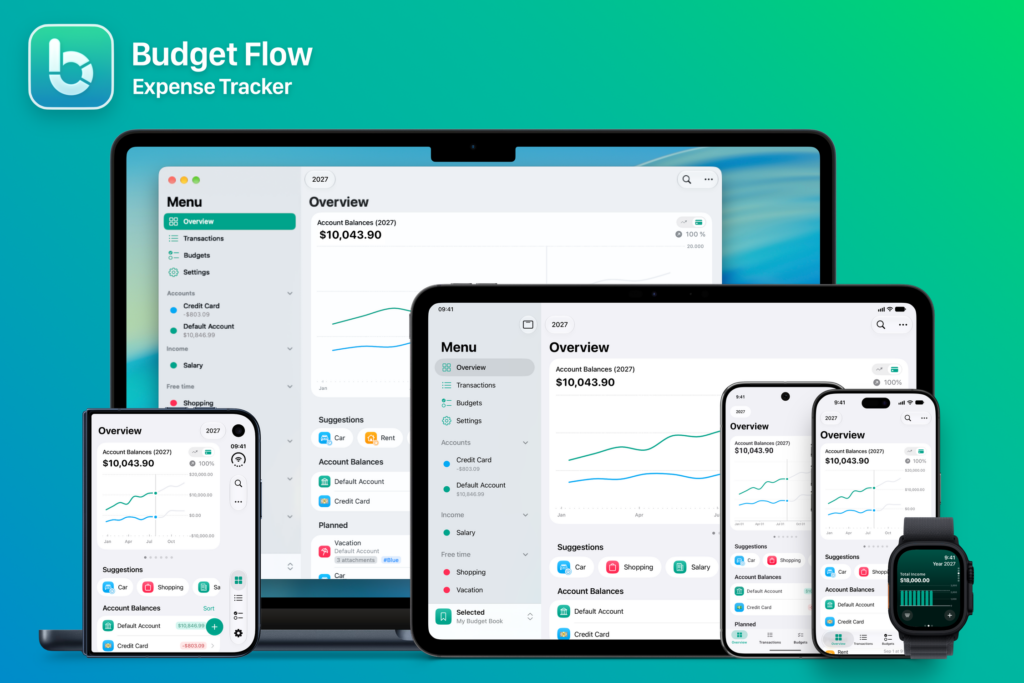
Figure 01: Budget Flow across Apple and Android devices
Background
Budget Flow is a modern and easy-to-use expense tracking app for iOS, iPadOS, macOS, and watchOS, first released in July 2023. The app was developed using Swift, Core Data, and CloudKit, while the interface was built primarily with UIKit and Storyboards in Interface Builder, alongside some SwiftUI components for charts and widgets.
The UIKit-based foundation resulted from my first app, a timetable app I started developing in late 2018 during my bachelor’s studies, before SwiftUI was introduced. It already included many of the building blocks Budget Flow needed, such as onboarding, search and filtering, adding and editing records, in-app purchases, settings, widgets, persistence, and CloudKit synchronization. Reusing this foundation allowed me to focus on Budget Flow’s own features rather than rebuilding everything from scratch. When development of Budget Flow began in 2021, SwiftUI was also still evolving and did not yet cover all of the app’s UI requirements, which is why I chose to continue using UIKit and Storyboards at the time.
Over the following years, however, SwiftUI matured, making a migration increasingly practical. Expanding beyond Apple platforms had also been an idea from early on, initially with a web app in mind. As Budget Flow gained traction, requests for an Android version became more common, leading to concrete development plans by mid-2025.
Evaluating Approaches
To evaluate possible approaches, I developed small proofs of concept (PoCs) using native Android (Kotlin and Jetpack Compose) and common cross-platform frameworks such as Compose Multiplatform, Flutter, React Native, and Capacitor. All of these were viable options, but in the end each of them would have required learning a new tech stack and rebuilding existing functionality from scratch.
Keeping the existing app alongside a new Android implementation would also have required maintaining two codebases. For a solo developer, like me, this was the biggest concern because it would have meant doing the same work twice for every new feature, bug fix, or small adjustment.
Although replacing the existing app with a shared codebase could have reduced duplication, its deep integration with the Apple ecosystem and its existing data model would still have needed to be preserved to avoid a potentially risky migration for users. Flutter, for example, provides access to native APIs through plugins and Platform Channels, but any integrations not covered by existing plugins would have required custom code and ongoing maintenance.
Beyond that integration work, recreating the interface with custom-rendered controls would also have risked losing some of the native look and feel that many existing users appreciate. This concern is sometimes described as the uncanny valley of user interfaces, where an interface looks native at first glance but feels different in use.
Choosing Skip
Another option that came up during this evaluation was Skip, a framework created in 2023 by Marc Prud’hommeaux and Abe White that brings Swift and SwiftUI to Android. The basic idea of Skip is to keep developing in Swift and SwiftUI using Xcode, rather than adopting to a new language, UI framework, and development environment.
Skip offers two modes: Lite and Fuse. In Lite mode, Swift is transpiled into human-readable Kotlin code, while SwiftUI views are converted to Jetpack Compose. In Fuse mode, however, Swift code is compiled natively for Android. It still uses Jetpack Compose for the interface but additionally generates Java Native Interface (JNI) bridging code to connect Swift with the Kotlin-based UI and other Kotlin or Java APIs.
When deciding between Skip Lite and Fuse, the main factors for me were long-term independence and straightforward Android integration. At the time of this evaluation, Skip was not yet fully free and open source, so having generated Kotlin code that could be maintained independently offered a valuable fallback in case Skip was discontinued at some point in the future. Skip Lite also allowed me to call Kotlin APIs and integrate Compose components directly from Swift code using conditional compilation, without the need for bridging. This kept Android integration, debugging, and testing much simpler for my workflow.
Skip Fuse, on the other hand, offered native Swift execution, potential performance benefits, and broader Swift and Foundation support. However, since most of the APIs and libraries Budget Flow needed were already available in Skip Lite or could be ported with relatively little effort, those benefits carried less weight than Lite’s simpler integration and independent maintenance path. Therefore, I chose Skip Lite for the Android implementation.
However, it still needed to be tested whether Skip could meet the app’s requirements in practice. A further PoC in late 2025 focused on the following areas, which were particularly important for Budget Flow:
- Persistence: Keep the existing data model and Core Data storage, including CloudKit synchronization and sharing. Existing Apple users should retain their data and features without migrating to a replacement persistence stack.
- Shared UI: Common UI components such as lists, forms, and controls should work on both platforms.
- Integrations: Retain Swift Charts on Apple, integrate Vico Charts on Android, and test third-party services such as RevenueCat and Firebase Crashlytics through Skip’s libraries.
Since the results of this PoC were convincing enough, I decided to continue with Skip. Platform-specific implementations would still be needed for some parts, but could stay in the same Swift project using conditional compilation, with direct access to existing Apple APIs.
Migration Strategy
To migrate the app to SwiftUI and Skip, the initial plan was to first extract the model, persistence, and logic code into a shared package and then create a separate UI package containing the new SwiftUI views used by both platforms. While this approach sounded great in theory, allowing features to be migrated gradually while the existing app remained in place, it proved difficult to implement in practice.
To minimize changes to the existing code, I initially tried to provide a lightweight version of Core Data with a similar API for Android. However, Core Data does much more than access a database, providing features such as lazy loading through faulting and caching of fetched data. Matching the API without adequately reproducing its behavior resulted in an implementation that technically worked but performed poorly on Android, especially with larger datasets. Recreating more of Core Data’s functionality would have been possible, but at the cost of disproportionate complexity and maintenance work.
Repository Pattern
These problems led me to take a different approach. Instead of recreating Core Data’s API on Android, I introduced the repository pattern to separate the business logic from the persistence layer.
By exposing data operations through shared protocols and exchanging platform-independent data transfer objects (DTOs), repositories hide how the data is stored and retrieved. This allows each platform to implement those operations using its own persistence stack. Although this required more extensive refactoring, it eliminated the need for shared code to depend on Core Data-specific behavior.
In simplified form, Budget Flow’s repository architecture looks like this:
graph TD
    consumers["ViewModels and Services"]:::shared <-->|"DTOs"| repositories["Repository Protocols"]:::shared

    subgraph darwin["Apple"]
        style darwin stroke:#8cc5ed,stroke-dasharray: 5,fill:#eef8fe

        coreData["Core Data Repositories"]:::darwin
        appleStorage["Core Data / CloudKit"]:::darwin
        coreData <--> appleStorage
    end

    subgraph android["Android"]
        style android stroke:#86d99a,stroke-dasharray: 5,fill:#eefaf1

        skipSQL["SkipSQL Repositories"]:::android
        androidStorage["SkipSQL"]:::android
        skipSQL <--> androidStorage
    end

    repositories <--> darwin
    repositories <--> android

    classDef shared fill:#dfd0f0,stroke:#9b7fc2,color:#000
    classDef darwin fill:#7ec0f2,stroke:#5ab0f2,color:#000
    classDef android fill:#6cce84,stroke:#4dc46a,color:#000
Figure 02: Shared repository interfaces and platform-specific persistence
As you can see, Apple builds retain Core Data and CloudKit with the existing data model and database schema, preserving synchronization and sharing capabilities. Android, on the other hand, uses SkipSQL, Skip’s lightweight wrapper around SQLite.
The main benefit of the repository pattern was decoupling business logic and UI code from the persistence implementation. This allowed me to keep the existing Apple persistence stack while sharing the rest of the app with Android. Calculations and presentation code work against shared interfaces, while each backend handles its own queries and storage operations.
On the downside, this approach required additional protocols, DTO mappings, and two implementations of each repository operation. Changes to data access could therefore affect both backends, with tests needed to ensure consistent behavior. For me, however, keeping the Apple persistence stack intact while sharing the rest of the app outweighed that additional work.
The repository pattern could also have been introduced within the original shared-package approach. However, doing so would have required adapting the existing UIKit- and Storyboard-based app while developing its SwiftUI replacement. On top of that, maintaining and testing both versions would have added substantial work and prolonged the migration process. Since the existing UI was going to be replaced anyway, I did not consider the additional transitional work worthwhile.
Instead, I continued development in a fresh Skip app project, bringing over and adapting code and features step by step. This project became the basis for both the Android app and the new version of the existing Apple app, replacing its previous implementation while retaining its data and persistence stack. This also follows Skip’s documented migration approach of creating a new Skip app and adding the existing app’s code and dependencies.
Since Apple users’ existing data and database schema remained unchanged, they could install the modernized app as a regular App Store update without a database migration. This compatibility with the previous app version also provided an additional safety net if a rollback became necessary.
Overall Architecture
Once the basic structure and repository abstractions were in place, features were migrated one at a time, starting with budget books, accounts, and categories, followed by transactions, budgets, and the dashboard. Each migration included data access, logic, view models, and views. UIKit/Storyboard views were rewritten in SwiftUI, while existing models, view models, calculations, and service logic could often be simply adapted.
Rewriting the interface in SwiftUI was mostly straightforward as I was already familiar with SwiftUI and knew how the app should behave. Additionally, many screens followed common patterns, such as lists and forms. Therefore, much of the work involved reimplementing existing screens rather than designing new ones. Navigation and passing data between screens were also easier to manage in comparison to the previous Storyboard and segue-based setup.
While most screens could be shared through Skip, some platform-specific work was required to make the Android app look and behave as expected. Input handling, sheet dismissal, and certain layouts needed adjustments, while some UI components used separate native implementations. One example was image loading in lists, where scrolling would stutter on Android even in release builds. That’s because Skip decoded images created directly from binary data synchronously, so I switched the Android implementation to asynchronous loading through Coil.
For larger differences, I kept the shared interface in a base file and split the implementations into +Apple.swift and +Android.swift files, selected through conditional compilation. For example, LineChart.swift defines the shared interface and chart data, while LineChart+Apple.swift uses Swift Charts and LineChart+Android.swift uses Vico Charts. Therefore, callers use the same chart component regardless of which platform renders it.
Once the main app had been migrated, I brought the Apple Watch app, widgets, share extension, and other Apple-specific integrations into the new project. Since the Apple side remained a standard Xcode project, these targets could be integrated using the common Xcode tooling.
The resulting overall architecture of Budget Flow looks like this:
%%{init: {"flowchart": {"wrappingWidth": 300, "padding": 12}}}%%
graph TD
    subgraph clients["Clients"]
        subgraph android["Android"]
            android_app["Main App
[Skip]"]:::android
        end

        subgraph darwin["Apple"]
            darwin_app["Main App
[iOS, iPadOS, macOS (Catalyst)]"]:::ios
            watch_app["Watch App
[watchOS]"]:::watch

            subgraph apple_extensions["Extensions"]
                direction LR
                share_sheet["Share Sheet"]:::extension
                widgets["Widgets"]:::extension
                intents["Intents (UI)"]:::extension

                share_sheet ~~~ widgets
                widgets ~~~ intents
            end
        end
    end

    subgraph packages["Packages"]
        app_shell["BudgetFlowApp
App Shell Package
[Composition]"]:::shell
        app_ui["BudgetFlowAppUI
App Presentation Package
[Screens, Forms, App UI State]"]:::ui
        charts["BudgetFlowCharts
Charts Package
[Chart Components]"]:::charts
        core_ui["BudgetFlowCoreUI
Core UI Package
[Core UI Components]"]:::coreui
        core["BudgetFlowCore
Core Package
[Domain, Repositories, Persistence]"]:::core
        translations["BudgetFlowTranslations
Translations Package
[Localized Resources]"]:::translations
    end

    %% Client dependencies
    darwin_app --> app_shell
    android_app --> app_shell

    watch_app --> core_ui
    watch_app --> charts
    watch_app --> core

    apple_extensions --> app_ui
    apple_extensions --> charts
    apple_extensions --> core_ui
    apple_extensions --> core

    %% Package dependencies
    app_shell --> app_ui
    app_shell --> core_ui
    app_shell --> core
    app_shell --> translations

    app_ui --> charts
    app_ui --> core_ui
    app_ui --> core
    app_ui --> translations

    charts --> core_ui
    charts --> core
    charts --> translations

    core_ui --> core
    core_ui --> translations
    core --> translations

    %% Subgraph styles
    style clients stroke:#cccccc,stroke-dasharray:5,fill:transparent
    style darwin stroke:#8cc5ed,stroke-dasharray:5,fill:#eef8fe
    style android stroke:#86d99a,stroke-dasharray:5,fill:#eefaf1
    style apple_extensions stroke:#8cc5ed,stroke-dasharray:5,fill:transparent
    style packages stroke:#cccccc,stroke-dasharray:5,fill:transparent

    %% Node styles
    classDef ios fill:#7ec0f2,stroke:#5ab0f2,color:#000
    classDef android fill:#6cce84,stroke:#4dc46a,color:#000
    classDef watch fill:#95cdf4,stroke:#5ab0f2,color:#000
    classDef extension fill:#acd8f6,stroke:#5ab0f2,color:#000
    classDef shell fill:#eeeeee,stroke:#aaaaaa,color:#000
    classDef ui fill:#f4cb91,stroke:#bd8e49,color:#000
    classDef coreui fill:#f7d7da,stroke:#c77b86,color:#000
    classDef charts fill:#bfeee8,stroke:#5fb8ad,color:#000
    classDef core fill:#dfd0f0,stroke:#9b7fc2,color:#000
    classDef translations fill:#f2e6a7,stroke:#bca44d,color:#000
Figure 03: Project and package structure
In this structure, BudgetFlowApp handles app composition, navigation, and lifecycle. App screens and their view models live in BudgetFlowAppUI, supported by reusable controls in BudgetFlowCoreUI and chart components in BudgetFlowCharts. BudgetFlowCore provides the shared domain types, business logic, repository interfaces, and persistence implementations, while BudgetFlowTranslations supplies localized resources for both platforms.
I won’t go into the implementation details here, but this architecture allows most of the app’s functionality to be shared while keeping platform-specific integrations separate.
Lessons Learned
Once the first beta versions of the modernized Apple app and the new Android app were ready, several lessons from the migration stood out.
Overall, I would say that the most difficult part of the migration was establishing a solid foundation. Simply porting the existing code wasn’t enough, since I had to reconsider the dependencies, define the package boundaries, and make the platform differences explicit (such as persistence with Core Data and SkipSQL, platform-specific UI implementations such as charts, and Android-specific APIs).
After the repositories and initial screens were up and running, adding more features became much easier. The amount of restructuring needed, however, depends on the starting point. For Budget Flow, this also included rewriting the UIKit- and Storyboard-based interface in SwiftUI. An app that already uses SwiftUI, is organized into well-defined packages, and is less tied to Apple-specific frameworks may require considerably less work.
Another key learning was that shared source code does not always mean identical runtime behavior. With Skip Lite, code that runs as Swift on Apple platforms becomes Kotlin on Android, with a different memory management model. In Budget Flow, large fetches and temporary objects created during in-memory calculations contributed to garbage collection activity and occasional pauses. Loading only the data needed, reducing intermediate allocations, and moving suitable filtering and aggregation into the database became important parts of the optimization work. Android’s memory management documentation explains why allocation patterns matter. A nice side effect, though, is that optimizations to shared calculations and data handling benefit Apple users as well by reducing unnecessary work and memory usage.
Testing on both platforms was also essential, but Skip made it straightforward to reuse automated logic tests since it supports cross-platform test execution through Robolectric or on an Android emulator or device, as described in the Skip testing documentation. This provided a quick way to catch regressions and differences between the Apple and Android implementations, whether they came from the code itself or differences in runtime and API behavior.
For performance checks, I installed optimized release builds with R8 enabled on a physical Android device. This gave a more representative picture than debug builds or Robolectric tests. Standard Android tools remained available, including Android Debug Bridge (adb) and the Android Studio profiling tools, to investigate memory usage and runtime performance.
There was still a learning curve with Skip itself and Android development in general. Some functionality I needed was also missing or incomplete, including calendar calculations, scheduled local notifications, and parts of the UI.
To fill those gaps, I implemented the missing functionality and contributed the additions and fixes to Skip’s GitHub repositories so other developers can benefit from them too, just as I benefited from other developers’ contributions. That is also why I would encourage others to contribute their improvements back to the project.
Conclusion and Outlook
For Budget Flow, using Skip made a lot of sense as a way to bring an established Swift app to Android while preserving its deep integration with the Apple ecosystem. Although the migration required substantial work, especially rewriting the UIKit- and Storyboard-based interface in SwiftUI, I think the effort was worthwhile because it resulted in a modern tech stack and a largely shared codebase that provides a solid foundation for future development on both platforms.
Other projects may make a different choice. Kotlin experience can make Compose Multiplatform attractive, a web background may favor React Native or Capacitor, and Flutter offers its own approach to a shared interface. Existing code, platform requirements, and the people maintaining the app matter more than choosing a framework in isolation. However, if you already have a Swift app, especially one built with SwiftUI, and want to bring it to Android, I think Skip is definitely worth looking into.
There are also different ways to use Skip. For example, the prediction market platform Polymarket also uses Skip for its Android implementation by sharing Swift models, business logic, and view models while maintaining a separate Compose interface for the UI. Budget Flow goes a step further in terms of code sharing by also sharing most of its SwiftUI presentation code. Whether you want to share specific parts of your app or almost the entire codebase between iOS and Android, Skip supports both approaches.
That said, Skip is not perfect, and its ecosystem is younger and smaller than those of Flutter, Compose Multiplatform, and React Native. In my experience, it already provides a solid foundation, with extensive API support, useful integration libraries, good documentation, and a smooth development workflow in Xcode. There are fewer third-party tutorials and code examples, though, and some issues required reading and modifying the framework’s code. Therefore, I would currently be more comfortable recommending Skip to experienced developers willing to look beyond their own app code and work with Android APIs and tooling.
Nevertheless, I see a lot of potential in Skip, especially because many apps begin as native iOS apps and eventually reach a point where users request Android support. Skip offers a way to build on existing Swift code and knowledge rather than replacing the entire app with a different stack or maintaining two separate implementations. Making an established Swift app compatible with Skip still requires effort; it is not simply a matter of installing the plugin and building the app. In my opinion, though, that initial effort is worth it in the long run because it means spending less time implementing and maintaining the same features and fixes twice.
The broader direction is encouraging, too. In March 2026, Swift 6.3 introduced official Android support, providing a maintained foundation for native Swift on Android. While this directly benefits Skip Fuse rather than changing Skip Lite’s transpilation model, it is a positive step for the wider Swift-on-Android ecosystem. Also, a dedicated team of maintainers is currently taking shape to support Skip’s continued development. Having joined on October 1, 2026, I’m proud to be part of this team and excited to help shape the framework’s future.
Without Skip, Budget Flow would probably never have made its way to Android, and I suspect the same is true for many other apps built with it. So I’d like to take this opportunity to thank Marc and Abe for creating Skip and making this possible, as well as all the contributors helping to improve it.
As for Budget Flow itself, version 4.0.0 (which is based on the new Skip project) has already been released through the App Store. Thankfully, apart from a few minor regressions, the transition went smoothly for existing users.
The Android app is now entering public beta on Google Play. If you would like to see it in action, feel free to give it a try! Your feedback will help me address any remaining issues and prepare for the full Android release.
Beyond that, the plan is to work through many of the requested features on the public roadmap. Among them, one of the most significant features planned for 2027 is cross-platform synchronization, which will allow users to keep their data in sync between Apple and Android devices. So stay tuned for that!
Thanks for reading! 😊
Fabian Hasse
Developer of Budget Flow